Legacy articleThis material is being preserved while updated documentation is prepared. Some screenshots or interface steps may reflect an earlier version of the application.
How to get notified about your portal activity
The Data Sheet Solutions platform allows you to setup an automatic email triggered by various actions within the portal. This can be particularly useful when using our Employee Request functionality.
In order to know about a new employee chemical request without having to periodically login and check the administrative dashboard.
Step 1. Login to your Admin Account
To setup a notification, you will need to login to the administrator dashboard.
Step 2. Access the Notifications Window
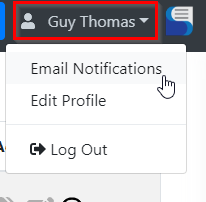
Select your name in the upper right hand corner to access the profile menu.
From here, select the "Email Notifications" menu item.
Step 3.Configure your Notifications
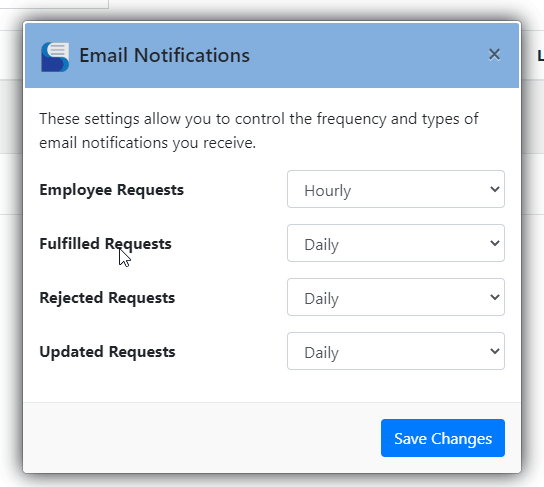
Configure the frequency that you want to receive emails regarding various portal activities and click "Save Changes".
Note: Toolbox Accounts will have not show the Rejected or Updated notification types.